
Download JSONGrid Desktop – JSON viewer, data visualization, spreadsheet-like JSON, developer tool, Windows utility
Overview
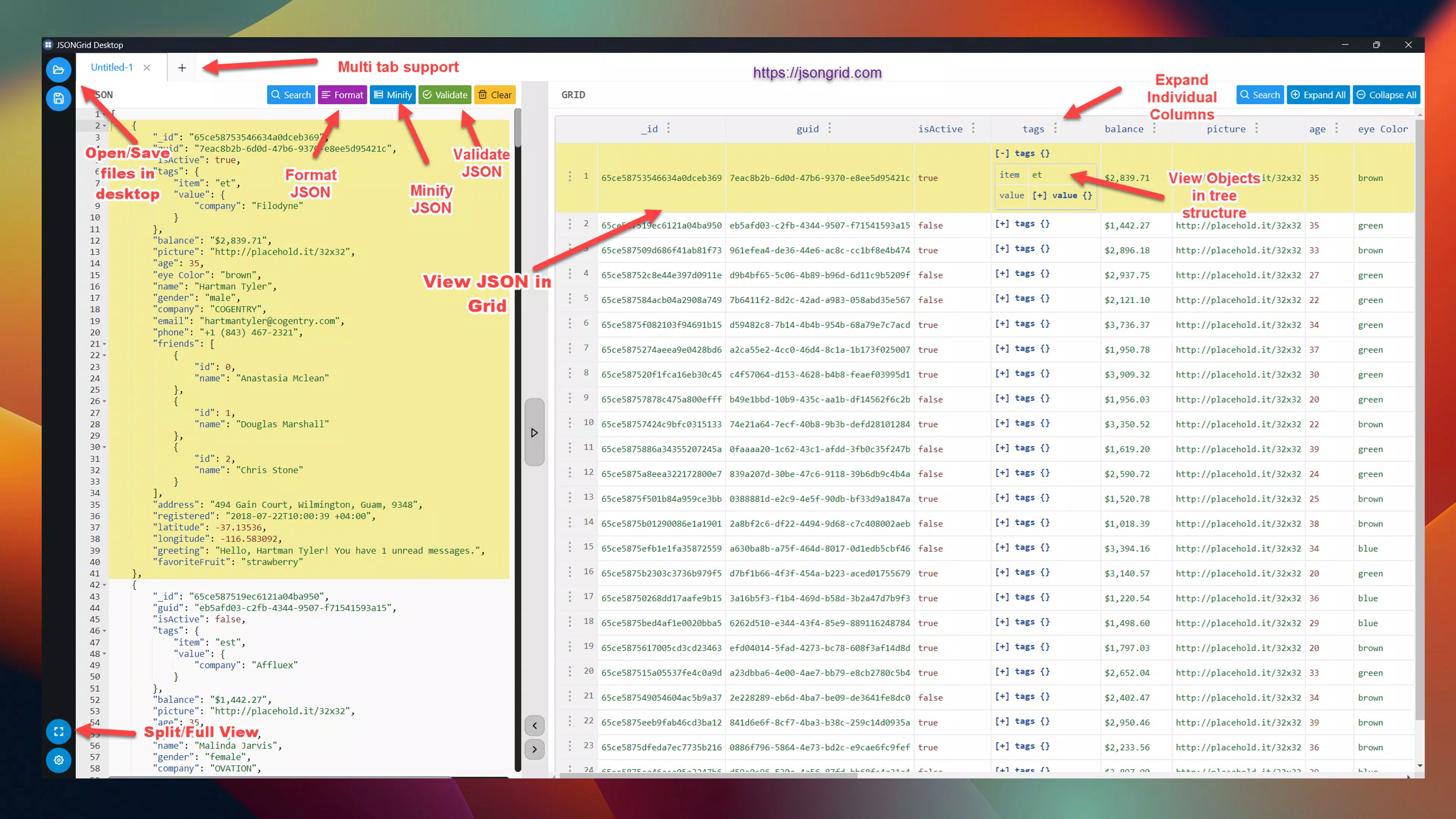
JSONGrid Desktop is a productivity-focused utility designed to simplify the management and inspection of JSON data on the Windows platform. Targeted primarily at developers, data analysts, and technical professionals, the app addresses the common challenge of navigating complex, nested JSON structures that are difficult to interpret in raw text form. By transforming JSON into a grid-based, spreadsheet-like interface, it enhances readability and enables faster data exploration. The application eliminates the need for manual parsing or external tools, offering a dedicated environment for working with structured data directly from the desktop.
Real-world use cases include debugging API responses, analyzing configuration files, reviewing data payloads in development workflows, and preparing reports from structured datasets. The app’s intuitive design supports both novice and experienced users who need to inspect JSON without deep coding knowledge. Although the developer, Thomas P.
Larson, is listed, no further background or company affiliation is available. Despite this, the app’s focused functionality suggests a practical, user-driven development approach. In the broader app ecosystem, JSONGrid Desktop fills a niche gap by providing a lightweight, efficient alternative to full-featured code editors or online validators.
Key Features & Functionality
- Grid-Based Visualization: Complex JSON structures are rendered in a clean, tabular layout, allowing users to instantly grasp hierarchical relationships. This visual format is ideal for identifying patterns, spotting anomalies, and comparing values across entries—especially useful when reviewing large or deeply nested datasets.
- Interactive Navigation: Users can expand or collapse nested objects and arrays with simple clicks, enabling precise exploration of specific data segments. This feature reduces cognitive load and speeds up the process of locating relevant information within intricate data trees.
- Powerful Filtering & Search: Built-in search and filtering tools allow users to locate specific fields, values, or structural elements across large files. This capability is particularly valuable when working with extensive JSON payloads, such as those from APIs or databases.
- Customizable Formatting: Users can adjust column widths and indentation levels to tailor the display to their workflow preferences. This level of control enhances usability and supports consistent data presentation across projects.
- Seamless Integration: The app supports direct file import and clipboard paste for JSON data, with options to copy or export results. This makes it easy to share findings, integrate with documentation, or pass data to other tools without additional conversion steps.
Practical Use Case Example
For instance, a developer troubleshooting an API endpoint can paste the JSON response into JSONGrid Desktop, quickly filter for error codes, and expand nested objects to verify field values. The grid format allows side-by-side comparison of multiple responses, significantly reducing debugging time compared to reading raw JSON text.
Interface, UX & Performance
The user interface of JSONGrid Desktop is designed with clarity and efficiency in mind. The layout is minimal, placing the data grid front and center with intuitive controls for navigation and formatting. Visual cues such as expandable icons and highlighted search results enhance usability. The app’s navigation flow is linear and predictable, allowing users to move from file import to data inspection with minimal friction.
Although the developer did not list formal performance metrics, the app’s lightweight footprint of 10.5 MB suggests optimized resource usage. It is expected to run smoothly on standard Windows systems, including entry-level machines. Responsiveness appears to be a priority, as the interactive features like filtering and expansion respond in real time. Stability is implied by the app’s focused scope and lack of reported issues. The developer did not specify minimum OS requirements, but its compatibility with modern Windows versions is likely given its design and file size.
Platform Compatibility & Technical Requirements
JSONGrid Desktop is available exclusively for the Windows platform. The current version is 1.0.0, with a file size of 10.5 MB. The app is offered at no cost, making it accessible to a wide audience.
Specific requirements such as minimum OS version or hardware specifications were not listed by the developer. Compatibility information was not fully disclosed, but the lightweight nature of the application suggests broad compatibility with standard Windows installations. Users are advised to ensure their system meets general Windows desktop requirements for smooth operation.
Pros and Cons
- Lightweight and fast, ideal for quick data inspection
- Intuitive grid-based interface improves readability of complex JSON
- Powerful filtering and search tools for efficient data exploration
- Free to download and use with no in-app purchases
- Supports easy import, export, and sharing of JSON data
- No information provided on cross-platform availability (e.g., macOS, Linux)
- Compatibility with older Windows versions is unclear
- No built-in syntax highlighting or validation features
- Developer did not provide update frequency or roadmap
- Minimal documentation or onboarding guide available
FAQ
Is JSONGrid Desktop safe to download and use?
Yes, the app is free and available from a trusted developer. It does not require administrative privileges and operates locally without transmitting data externally.
Can I use JSONGrid Desktop on macOS or Linux?
Currently, the app is only available for Windows. No official versions for macOS or Linux have been released.
How do I import my JSON file into the app?
You can import JSON files directly through the file menu or paste JSON snippets from the clipboard. The app supports standard JSON formats.
Is there a mobile version of JSONGrid Desktop?
No mobile version has been announced. The app is designed exclusively for desktop use on Windows.
How often is the app updated?
The developer did not specify update frequency. The current version is 1.0.0, released on December 19, 2024.
Final Thoughts + CTA
JSONGrid Desktop stands out as a focused, efficient tool for anyone who regularly works with JSON data on Windows. Its grid-based visualization brings clarity to complex structures, making it easier to inspect, analyze, and share data without the overhead of full IDEs. While it lacks some advanced features like syntax validation or cross-platform support, its simplicity, speed, and zero cost make it a compelling choice for developers and analysts seeking a streamlined workflow.
For professionals who value productivity and clean data presentation, this app delivers tangible benefits. It’s especially useful in debugging, documentation, and collaborative environments where quick data interpretation is essential. If you’re looking for a reliable, secure, and free utility to manage JSON files on your desktop, this tool is worth trying.
Download JSONGrid Desktop now


